News
Scripts
Plugins
Characters
OpenGL
Shockwave3D
Resume
Russian
TrackMapper v1.1
TrackMapper
is utility that can set value for any objects animatable parameter in
the array of the same object type (combined in Selection Set) based on
pixel color of animated bitmap.
For instance, with TrackMapper it is really easy to simulate an outdoor
advertising board as image of lighting up lamps in a determined sequence.
Let's look, how TrackMapper works, on an example of the scene count01.max:
- close 3ds max and copy trackm11.ms
file to Scripts\Startup directory to install TrackMapper
- load the count01.max scene, select
all objects and name a selected set as All

- run the uniqmtls.ms script to assign a unique material to each object in the scene

- create new TMHelper01 object: Create panel > Helpers > TrackMapper > Object Type rollout > TMHelper

- select All from a drop-down list of Named Selection Sets rollup in Modify panel or enter All into Selection Set Name text box

- press Select Track button and pick Objects > Box01 > Box01Material > Shader Basic Parameters > Diffuse Color > R track in appeared Track View Pick dialog or enter material.diffuse.controller.R into Track text box

-
press Select Bitmap button and specify counter.avi
file
- change parameters in Parameters rollup: rgbChannel = R, mappingType
= XZ, Default Value = 150.0
- create two copies of TMHelper01 object, moving it with mouse, holding
Shift key

-
change parameters of TMHelper02 object: Track = material.diffuse.controller.
G, rgbChannel = G
- change parameters of TMHelper03 object: Track = material.diffuse.controller.
B, rgbChannel = B

- create new TMCollection01 object: Create panel > Helpers > TrackMapper > Object Type rollout > TMCollection

-
press Add All button to add TMHelper01 objects, TMHelper02, TMHelper03
to TMHelpers list, all changes can be seen after loading count02.max
file
- press MAP ALL button in Modify panel and wait, until all animation keys
are set

-
the finished scene can be seen after loading count03.max
file
TrackMapper allows not only to control animation controllers parameters
of Diffuse Color, but also other controllers:
Taper
modifier Amount parameter example

taper.avi (907KB)
One of Boolean object operands
X_Position parameter example
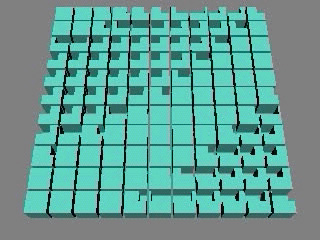
boolean.avi (644KB)